

BLOG
Invoicing and Getting Paid
Every experienced freelancer has a story about a client who doesn't pay or who is slow to pay. It's going to happen to you too, but there are a few ways to make such experiences less frequent.
Your first line of defense is your contract. You should include clauses that specify not only the amount the client will pay you, but also how and when. Along with the payment clause, have clauses that spell out precisely what the client is getting from you. That lays out your argument before it happens by saying, "I did A, B, and C as the contract specified." Now it's time to hold up your end of the bargain. But clauses are only as good as their enforcement, so it's important you have text in the contract that explains what will happen if you're not paid. It needs to be realistic, actionable and legal; and you have to be prepared to go through with it. For example, a common clause in the United States says that both parties will seek mediation or arbitration before going to court and it spells out the conditions.

You might ultimately decide it's not the worth the trouble to follow through, but again, someone is eventually going to try to get away without paying, so be prepared. Finally, don't start the work until the contract is signed or until you have other legal proof of agreement. This is the part that can be hardest because you'll be eager to get going. But it's important psychologically that the client acknowledge that the project is actually going to happen and that they will have to go through with their responsibilities. There is another way to make sure you get paid, and that's to take payment in advance, either partially or in full. I'm of two minds about this. On the one hand, requiring advance payment could hinder the sales process. You're essentially demanding that they trust you more than you trust them. On the other hand, they are going to have to pay you sometime, why not at the beginning. There is one situation where you should probably get payment upfront. If the job requires you to buy materials that are specific to the project or spend your own money to get it started, make sure the client covers those expenses first. In this area, you're just going to have to develop your own judgement and listen to the experiences of your colleagues.
So you have finished the work and now it's time to collect. As a reminder, you should present your client with an invoice. By the way, some accounting programs have their own invoicing function, including the popular QuickBooks. In any event, an invoice should include at least the following elements. Start with your contact information, then put the word INVOICE in big letters at the top of the page. That will help prevent it from being buried. Include a statement that you expect to be paid, how you should be paid and when the deadline for payment is. By the way, I'll often say something like, "In 45 days, but then I'll include the actual date." Then give a brief description of why you're getting paid. Here I'll often reference the agreement saying for example, In accordance with our contract of February the 15th. And of course, specify the amount you expect to be paid.
Some clients also like you to include an Invoice Number to help them track it in their records. And if it's for hourly work I'll paste my time sheet at the bottom of the page. Finally, send it off, make a note of the due date in your calendar and try to put it out of your mind. You can drive yourself crazy worrying whether someone is going to pay you, but remember until the deadline is passed there's nothing to be done. I found that most clients are pretty good about paying on time, especially after your first project together. Give them the benefit of the doubt, but then be prepared to act once the deadline is passed.
Did you enjoy this blog post? If so, then why not:
Leave Comment | Subscribe To This Blog | Email Me
Professionals Get Paid
A big distinction between amateurs and professionals is that professionals get paid for what they do. The first thing you'll need is a bank account for your business. I recommend you get one that's separate from your personal account. That makes bookkeeping easier and keeps you from having to give personal banking information to clients.

I found the simplest way to receive payments in the United States is to simply ask clients to send you a paper check, then deposit that in the normal way. However, you should also be prepared for electronic payments, particularly if you have clients outside your home country. Beyond traditional banks, you can also get paid through online payment systems such as PayPal. I found it to be great for smaller clients, but because it's not a real bank I do recommend that you sweep money from your PayPal account into your business bank account as soon as the money becomes available.
Although PayPal gives people a way to pay you with credit cards it's not as robust or as cheap as Merchant Card Systems. Those let you accept credit cards directly without PayPal as a mediator. Again, your bank can probably offer you such services or can refer you to somebody who can.
Whatever payment option you use, I recommend that you write it into your contract. For example, I might say, "Payment by check drawn on a United States Bank must be received by such and such date, payable to Bobby Parker" But it's also wise to ask the client how they prefer to pay and then make sure it's possible. After all, the more ways they can pay, the faster you'll get paid.
Did you enjoy this blog post? If so, then why not:
Leave Comment | Subscribe To This Blog | Email Me
Anyone Can Draw
“It is a child’s natural way to use art as a personal language. The child invents new ways to tell us about his ideas, impressions and feelings. This natural approach results in the exciting design which makes children’s art so vital...”
Did you enjoy this blog post? If so, then why not:
Leave Comment | Subscribe To This Blog | Email Me

Design Job & Career Salaries Infographic

Did you enjoy this blog post? If so, then why not:
Leave Comment | Subscribe To This Blog | Email Me
Setting Prices
One subject that provides freelancers a lot of anxiety is how to price their services. We want to make a good living, but are afraid of driving the market away by charging too much. So, What's the right amount?

Simply put, it's the area between charging too much and charging too little. Believe it or not, the bigger problem that freelancers face is that they charge too little. So, I'll talk about that first.
There are few reasons freelancers charge too little. If you're coming from a salary position where you did similar work, you might figure out your hourly rate there and charge private clients a similar amount. But that's way, way, way too low. First of all, you're not going to bill 40 hours a week. Another, You now have to cover expenses that your employer used to pay. One rule of thumb puts a typical freelance rate at two and a half times the hourly rate that freelancer would get with an employer. That's not always right, but the point is that your rates will be much higher per hour.
A second reason you might charge too little is that you can't believe someone would pay that much. But if you had never been on the buying side of the equation, you probably don't have a sense of how expensive good labor is. Talking to people in your professional network can help you figure out what the real market rates are. Or maybe you can believe someone would pay that much, but can't believe they would pay it to you. Assuming you have the skills that just basic insecurity talking. It's hard to get a sense of ones own value. Again, talk with colleagues and other professionals to determine what your realistic value is.
Some government bodies keep track of pay scales for various professions, and that gives you another data point.in the U.S., that's done by the Bureau of Labor Statistics. You can search for details on your profession in their Occupational Outlook Handbook at bls.gov/ooh.
The problem with charging too little isn't just financial. If you undercharge, prospective clients will see the low figure and suspect that you're just not very good. And established clients who have gotten used to your low rate will get spoiled wasting your time just because they can afford it. Higher rates make them value your time more leading to better work relationships and more fulfilling work. Now let's talk about charging too much. Basically, People buying your services have to justify the cost to themselves. It then comes down to a cost- benefit analysis for the buyer. The values are all pretty subjective, and they are not always easy for the buyer to measure in dollars, but they do perform such an analysis even if it's only in the back of their mind.\
If your rate is substantially higher than the cost of doing things internally or with another freelancer or not doing them at all, then you're out of a job. If you've gone through this whole process, you now have a reasonable understanding of what the market will bear. But there's one other factor; you have to make enough money to keep your business healthy. As with many other parts of freelancing, setting rates requires an understanding of your own value. It involves research and a certain amount of difficult soul-searching, but it can lead you to being able to charge your true value confidently and successfully.
Did you enjoy this blog post? If so, then why not:
Leave Comment | Subscribe To This Blog | Email Me
Up and Running with Office 365 (2011) with David Rivers
Get a thorough introduction to Microsoft's hosted collaboration and productivity suite. Author David Rivers tours the subscription service, showing how to administer user accounts; share Word, Excel, PowerPoint, and OneNote files with SharePoint; and manage mail, contacts, and calendars with the Outlook web app. The course also explains how to set up Office desktop apps to work with Office 365 and connect with colleagues using the Lync communication server.
Topics include:
- Choosing the right plan
- Defining and adding users
- Setting up a SharePoint team site
- Viewing and editing your web site
- Sending and receiving email
- Importing contacts into the Outlook web app
- Managing tasks
- Sending instant messages
- Conducting audio calls and online meetings
Up and Running with Office 365
Did you enjoy this blog post? If so, then why not:
Leave Comment | Subscribe To This Blog | Email Me
Pixar Animation Studios Open Subdivision Technology Review
Did you enjoy this blog post? If so, then why not:
Leave Comment | Subscribe To This Blog | Email Me
Scott Kelby Shows Hidden Gems in Photoshop
Did you enjoy this blog post? If so, then why not:
Leave Comment | Subscribe To This Blog | Email Me
Learn How To Use Your V-Ray Physical Camera
Play with the camera controls found in the "Creative Zone" of an EOS Digital SLR. Here, you can really dictate the outcome of your photos and get the effects you want. Your shots will appear below where you can review, get feedback and compare the settings you used.

Did you enjoy this blog post? If so, then why not:
Leave Comment | Subscribe To This Blog | Email Me
20 Factor Test – Independent Contractor or Employee?
The 20 factors used to evaluate right to control and the validity of independent contractor
classifications include:
- Level of instruction. If the company directs when, where, and how work is done, this control indicates a possible employment relationship.
- Amount of training. Requesting workers to undergo company-provided training suggests an employment relationship since the company is directing the methods by which work is accomplished.
- Degree of business integration. Workers whose services are integrated into business operations or significantly affect business success are likely to be considered employees.
- Extent of personal services. Companies that insist on a particular person performing the work assert a degree of control that suggests an employment relationship. In contrast, independent contractors typically are free to assign work to anyone.
- Control of assistants. If a company hires, supervises, and pays a worker's assistants, this control indicates a possible employment relationship. If the worker retains control over hiring, supervising, and paying helpers, this arrangement suggests an independent contractor relationship.
- Continuity of relationship. A continuous relationship between a company and a worker indicates a possible employment relationship. However, an independent contractor arrangement can involve an ongoing relationship for multiple, sequential projects.
- Flexibility of schedule. People whose hours or days of work are dictated by a company are apt to qualify as its employees.
- Demands for full-time work. Full-time work gives a company control over most of a person's time, which supports a finding of an employment relationship.
- Need for on-site services. Requiring someone to work on company premises—particularly if the work can be performed elsewhere—indicates a possible employment relationship.
- Sequence of work. If a company requires work to be performed in specific order or sequence, this control suggests an employment relationship.
- Requirements for reports. If a worker regularly must provide written or oral reports on the status of a project, this arrangement indicates a possible employment relationship.
- Method of payment. Hourly, weekly, or monthly pay schedules are characteristic of employment relationships, unless the payments simply are a convenient way of distributing a lump-sum fee. Payment on commission or project completion is more characteristic of independent contractor relationships.
- Payment of business or travel expenses. Independent contractors typically bear the cost of travel or business expenses, and most contractors set their fees high enough to cover these costs. Direct reimbursement of travel and other business costs by a company suggests an employment relationship.
- Provision of tools and materials. Workers who perform most of their work using company-provided equipment, tools, and materials are more likely to be considered employees. Work largely done using independently obtained supplies or tools supports an independent contractor finding.
- Investment in facilities. Independent contractors typically invest in and maintain their own work facilities. In contrast, most employees rely on their employer to provide work facilities.
- Realization of profit or loss. Workers who receive predetermined earnings and have little chance to realize significant profit or loss through their work generally are employees.
- Work for multiple companies. People who simultaneously provide services for several unrelated companies are likely to qualify as independent contractors. Availability to public. If a worker regularly makes services available to the general public, this supports an independent contractor determination.
- Control over discharge. A company's unilateral right to discharge a worker suggests an employment relationship. In contrast, a company's ability to terminate independent contractor relationships generally depends on contract terms.
- Right of termination. Most employees unilaterally can terminate their work for a company without liability. Independent contractors cannot terminate services without liability, except as allowed under their contracts.
Did you enjoy this blog post? If so, then why not:
Leave Comment | Subscribe To This Blog | Email Me
How Freelancing and Employment Differ
The I.R.S., that's the U.S. government's tax authority says that a freelancer is an independent contractor if the payer has the right to control or direct only the result of the work and not what will be done or how it will be done. In other words, the client could say, render my building and deliver the results as a Layered Photoshop File, and you'd still be considered a freelancer. But if the client says, "You must use 3D Studio MAX and do the work in our office between 9 AM and noon," then the I.R.S. is likely to consider you an employee rather than an independent contractor which would lead to differences in such things as tax withholding, benefits and so on. Such distinctions vary from country to country. In the U.S., the I.R.S. released some specifics that set forth 20 factors to separate employees from independent contractors. But on a day-to-day level, you'll be more affected by the practical differences. The big one is, if something needs doing, you're the one to do it, and there's nobody else to blame if it doesn't get done. You're now in charge of among other things, marketing, sales, accounting, project management, IT, and legal matters. You also have to keep yourself busy, and motivated. And if you expand by hiring other people, you have to become your own human resources department. If you think that's all daunting, well, you're right. Finally, we come to the personal differences between freelancing and employment. That is, how your mentality and lifestyle will change. For example, you're likely to find your work life creeping into your personal life and vice-versa. So it becomes much harder to judge whether you're being productive. And that can lead to some unexpected anxieties.

Freelance
Did you enjoy this blog post? If so, then why not:
Leave Comment | Subscribe To This Blog | Email Me
Great Texture Resources
Need a texture? Here is a list of sites that I use often, and can suggest to you as a sumptuous texture resource. If you have any additional references, please add to the list by adding a comment.

Texture Library Resources
Did you enjoy this blog post? If so, then why not:
Leave Comment | Subscribe To This Blog | Email Me
The Evolution of the 3D Industry Panel: Who will survive?
Did you enjoy this blog post? If so, then why not:
Leave Comment | Subscribe To This Blog | Email Me
Breathing Space
Position your subject so there is sufficient "breathing room" between the front of your subject and the rendering border. Otherwise, things can appear cramped or crowded-even off-balance. It's unnerving for the viewer to see a subject just about to leave the frame.

Motion Blur
Did you enjoy this blog post? If so, then why not:
Leave Comment | Subscribe To This Blog | Email Me
Keep An Open Mind
A major part of any staging process involved trail and error, shifting objects around while paying close attention to how the objects interact. Consider how colors overlap, how objects cast shadow on one another and how certain effects are more pleasing than others.
Here Are 7 Tips For Better Composition.
- Have a basic layout in mind, vertical or horizontal.
- Have reference photos
- Removing objects can be as helpful as adding new ones
- Experiment
- Cast shadows are a wonderful way to explain form. A shadow gives solidity to the object casting the shadow, and the shape of the shadow can help explain other forms as well.
- As you refine a composition, pay attention diagonal lines and angles created by objects; try to make diagonals more interesting through a slight adjustment. Also avoid creating tangents (places where objects abut or overlap one another) that are visually confusing.
- Be open to removing something if it isn't working, even towards the end of th process. Fine tuning the negative spacing, as well as the way the various shapes overlap.

Keep An Open Mind
Did you enjoy this blog post? If so, then why not:
Leave Comment | Subscribe To This Blog | Email Me
Good composition
“Good composition is like a suspension bridge - each line adds strength and takes none away.”
Did you enjoy this blog post? If so, then why not:
Leave Comment | Subscribe To This Blog | Email Me
ARCHITECTURAL 3D AWARDS 2013
The CGarchitect Architectural 3D Awards are the largest awards event for the architectural visualization industry. Now in its 10th year, the awards attract entries from top studios, freelancers and students from around the world.

The CGarchitect.com Architectural 3D Awards were started in 2004 to recognize outstanding achievement in the field of architectural visualization. In such a competitive field it becomes more and more difficult make yourself seen. With the wide visibility of CGarchitect, what better way to use this exposure than to help the artists that make up our community. 2013 marks our 10th annual awards, which will once again take place in La Coruna, Spain during the Mundos Digitales conference. Past awards have taken place in Los Angeles, San Diego and Boston. Over the past nine years many extremely talented individuals and companies have gone on to form new alliances and partnerships and advanced their careers.
Did you enjoy this blog post? If so, then why not:
Leave Comment | Subscribe To This Blog | Email Me
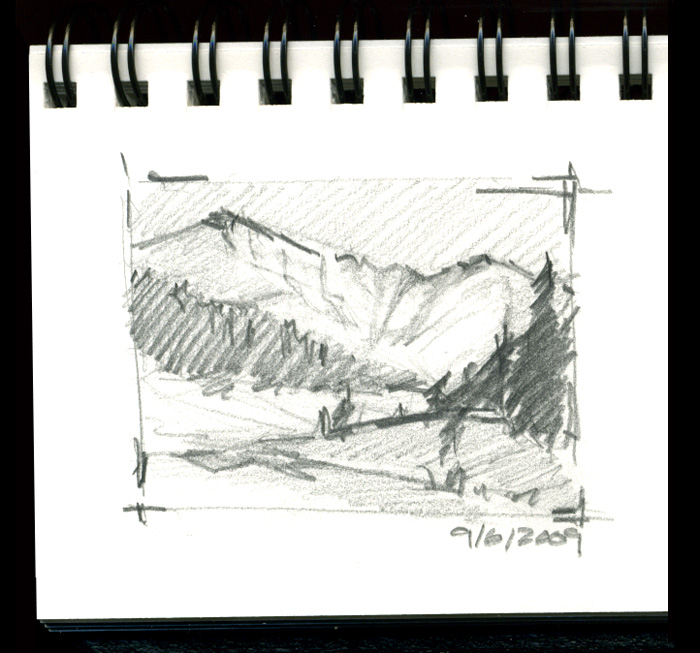
Thumbnail Sketches
Sketching is a good way to build your composition with simple shapes, lines, and tone. Nobody has to see your sketches, and they don't need to be refined; just start sketching. Start with simple shapes, and build upon that. Your sketches can fall into three groups.
Croquis
A Croquis is a thumbnail sketches that establish the image's main concept and sets the composition by indicating the most important shapes and values.
Esquisse
An Esquisse is a refined version of the Croquis: a more resolved thumbnail with a refined value structure and something closer to the final composition.
Étude
Is a drawing of an individual natural element, such as a tree, a patch of undergrowth, or a rock outcropping.
Thumbnail Sketches
Did you enjoy this blog post? If so, then why not:
Leave Comment | Subscribe To This Blog | Email Me
Creating a Strong Composition
The composition should be simple, and it should be about one thing, or concept. A deft artist can make even the most mundane subject interesting.
- When in doubt, keep it simple. Less is more.
- Take time to plan out your composition.
- interesting renderings have a harmonious balance of opposites, such as cool and warm, dark and light, thick and thin textures, detail and ambiguity, and hard and soft edges.
- The unequal treatment of these elements is pleasing to our senses.
Seek an interesting flow of eye movement - avoid a static composition.
Great compositions don’t just happen by accident. They take planning, patience, and a knowledge of all the visual elements at your disposal.

Did you enjoy this blog post? If so, then why not:
Leave Comment | Subscribe To This Blog | Email Me
Locking Transforms For Blueprint Modeling
Previously, I showed you how I model in 3DS MAX Design by creating a high resolution bitmap, using a DirectX Shader. Well, once you get your blueprints in place, you need to lock them down, so you don't accidentally mess things up.

I want to slide the plane back and forth, but only on one direction, and never up or down. It's very easy to accidentally nudge something slightly, so locking things down is very important.
Did you enjoy this blog post? If so, then why not:
Leave Comment | Subscribe To This Blog | Email Me