BLOG

What is Color Temperature?
Understanding color temperature is one of the crucial rules of architectural rendering you must learn before you can begin to break them.
So what is color temperature? In short, each light source has its own individual color, or ‘color temperature’, which varies from red to blue.
Candles, sunsets and tungsten bulbs give off light that’s close to red (hence the ‘warm’ look they give to pictures), whereas clear blue skies give off a ‘cool’ blue light. It’s fairly obvious stuff once you read it.
Color temperature is typically recorded in kelvin, the unit of absolute temperature. Cool colors like blue and white generally have color temperatures over 7000K, while warmer colors like red and orange lie around the 2000K mark.
In the infographic below we’ve illustrated the color temperature scale and show you where these popular white balance settings sit within it. We’ve also shown where some common shooting conditions, such as hazy skies and sunsets, sit within the color temperature scale and what white balance setting you might want to use to capture accurate colors in these conditions.
To view the larger version of this photography cheat sheet simply click on this infographic or drag and drop it on to your desktop to save as a reference.


V-Ray 3.0 for 3ds Max Beta
The V-Ray® 3.0 for Autodesk® 3ds Max® Beta program is now open.
With this beta program, our users can get their hands on new and improved features and capabilities of the best version of V-Ray yet. Thanks to our continuous work with 3D artists all over the world, V-Ray 3.0 for 3ds Max has now become the most complete lighting, shading and rendering toolkit on the market.
We've set up a new website dedicated to become a new home for the V-Ray community. Be sure to check out www.v-ray.com for more V-Ray 3.0 related news and stay tuned for updates, videos and tutorials.
Eligibility
The V-Ray 3.0 for 3ds Max Beta program is available to licensed users of V-Ray for 3ds Max.
You may register for the beta program here. Our team will review your application and send you an email outlining next steps.

Feedback process
As a member of the beta community, you will get an advanced look at the upcoming features and enhancements in V-Ray 3.0. Plus you will have a unique opportunity to provide critical feedback, helping create the best version of V-Ray yet.
During the beta process, you will have direct access to our development team and the beta community via a V-Ray 3.0 for 3ds Max Forum. The forum is dedicated to sharing constructive feedback, works in progress, test renders, and user suggestions.
Time Frame
The Beta program will run for a period of approximately 3 months.
System Requirements
• A computer with 3ds Max 2011/3ds Max Design 2011 or later, 64 bit versions only;
• Windows XP, Windows Vista, Windows 7, Windows 8, 64 bit versions only;
• Intel Pentium IV or compatible processor with SSE2 support;
• 128 MB RAM and 350 MB swap minimum - recommended 4 GB or more RAM, 4 GB or more swap file;
• NUMA architecture is supported but not recommended*
Note: More efficient rendering on a NUMA machine is achieved with several copies of 3ds Max or DR render servers. In both cases each instance should be limited to one NUMA node because of the slower access that a core has to the rest of the RAM.
Autodesk 3ds Max is a registered trademark of Autodesk. V-Ray is a registered trademark of Chaos Software
Perfect Effects 4 Free
Improved! Library of Effects
Create images with impact using over 70 professional effects that help you enhance detail, add contrast, evoke moods, and more.

Combine Effects
Design a look all your own by combining multiple effects and adjusting the strength of each effect. With the live previews in Perfect Effects 4 Free, you can see what each effect will look like on your photo before applying it. Your creative options are limitless and easy to achieve with the easy-to-use tools in Perfect Effects 4 Free.
Masking Controls
Selectively apply any effect to specific parts of your photo with the powerful masking controls in Perfect Effects 4 Free. Use the Masking Brush to apply effects to specific areas and the Masking Bug to quickly create vignettes and graduated filter looks.


New! Paint-In Effects
With a handy set of Basic Brushes, you can solve some of your most common digital photography problems exactly where you need. Use simple brush strokes to make areas darker, lighter or warmer. Add detail, glow or more color. You can also reveal highlights and recover shadows.
New! Perfect Brush
Smoothly apply or remove effects to the specific areas you're working on without going "outside of the lines."
Turn on the Perfect Brush when using the Masking Brush or the Paint-in Effect Basic Brushes.

New! Blending Modes
Blend effects to create amazing and highly stylized looks in Perfect Effects 4 Free. By changing the Blending Modes, you can control the brightness, contrast and color of the image to dramatically alter the appearance. And, by adjusting the opacity, you can control the strength of the effect.
Combine Images for Endless Creative Options
In the Layers home module, you'll find tools designed specifically for photographers to combine the best parts of multiple photos and quickly retouch your images. You'll easily be able to swap faces or create a balanced exposure. You can also blend images for creative effects, create layouts, build composites, and more. Enjoy all of the benefits and creative power of a layered workflow, even without Adobe Photoshop. Your creative options are endless.


29 Ways to Boost Creativity
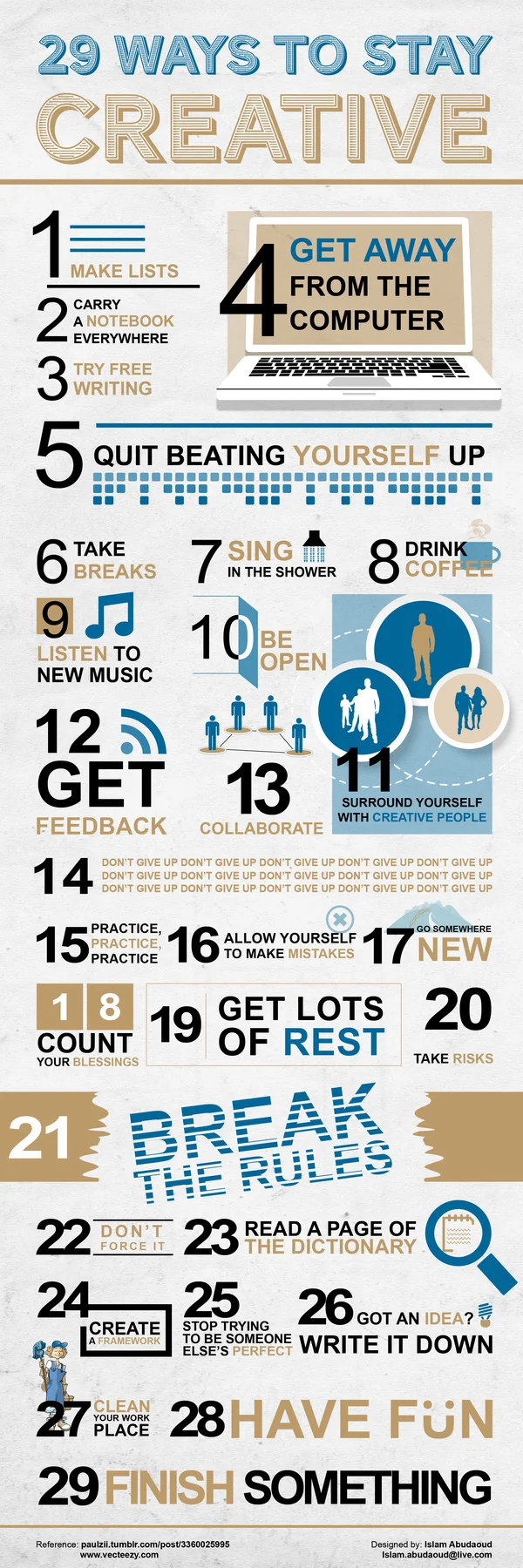
There’s no secret recipe to being creative. Generally when we’re researching new concepts or working on a new task, creativity breeds out of conception. That said, it’s easy to burn yourself out when consistently churning out new and creative ideas. There are however, a few ways to maintain your creative state of mind.
The below INFOGRAPHIC (from Islam Abudaoud) outlines 29 ways to wake and reinvigorate the creative side of your brain. Here’s some of our favourites:
- Carry a notebook everywhere you go, you never know when opportunity might strike!
- Get away from the computer, even if it’s for 5 minutes.
- Quit beating yourself up, stress can stunt creative thinking.
- Sing in the shower. Really, go for it!
- Be open. Don’t shut out ideas just because they’re unfamiliar, you’ll be surprised at what you can learn!
- Surround yourself with creative people.
- Always get feedback. It’s important that you know what you’re doing right/wrong in order to improve.
- DON’T GIVE UP!
- Break the rules. As long as you’re not harming yourself, or someone else – try going against the norm.
- Stop trying to be someone else’s perfect – just be YOU.
- Finish something. Even the most mundane of tasks can breed innovation, give yourself a sense of accomplishment!
- Get lots of rest. A tired brain is a useless one.
Impact The Perception
“Architectural illustrators must realize how their input can impact the perception of a project for good or ill, and the results of their aesthetics and integrity can have considerable influence.”
F*ck You. Pay Me.
Our speaker at the March 2011 San Francisco, CreativeMornings (creativemornings.com) was Mike Monteiro, Design Director, and co-founder of Mule Design Studio (muledesign.com). This event took place on March 25, 2011 and was sponsored by Happy Cog and Typekit (who also hosted the event at their office in the Mission).
Mike's book "Design is a Job" is available from A Book Apart (abookapart.com/products/design-is-a-job)
A big giant thank you to Chris Whitmore (whitmoreprod.com) for offering to shoot and edit the video. Photos were graciously provided by Rawle Anders (twitter.com/rawle42).
The San Francisco chapter of Creative Mornings is run by Greg Storey (twitter.com/brilliantcrank).
Follow us on Twitter at twitter.com/SanFrancisco_CM
Signing Nondisclosure Agreements (NDA) and Work-for-hire Agreements
Whether working directly with the client or through an agency, a freelancer architectural illustrator may be asked to sign one or both. It's also possible that a client or agency won't require either.
Let's start with an NDA; a Non-Disclosure Agreement. It's common that an agency will ask you to sign an NDA. Often, it means that their client has asked them to sign an NDA and that everyone working on the project understands that the work is confidential.
NDAs is written by attorneys, so that language is dense and confusing. I'll explain the basic gist of an NDA. The document states the date and place of the agreement along with the party's legal names. It ensures that the project is confidential and restricts any disclosure about any part of the project for a particular amount of time. Sounds simple, right? Yes, and no.

You may be asked to sign a Work for Hire agreement. It states that you will not own any of the work reproduced, even work that wasn't used. Work for Hire agreements means that, for whatever fee, you retain no copyright to the work you have done. If you are employed or an architectural illustration freelancer, the law states that, by default, you're working in a Work for Hire agreement. This ensures that when an agency sells your work to a client that it's theirs to sell. If you're working directly with the client, your agreement can be different.
Work for Hire agreements are very restrictive and should not be entered into lightly. As a freelance architectural illustrator, you need to be aware of who owns your work and when copyright transfers. It's common that copyright transfers from the designer to the client or agency when the designer is paid. Architectural Illustrators have contracts that sell limited rights to these images as opposed to the image itself. If you are acting as an architectural Illustrators, you should have two separate agreements stipulating what the agency owns or does not own, at what point, and for how long.

My final recommendation is that if you're in any way confused about a document given to you to sign, ask the agency or client to go through it with you point by point, just to make sure you're absolutely clear what you're agreeing to. Under no circumstances should you sign a document if you're not clear about what specific actions you need to take.
Cut the Crap
Simplicity in one phrase means, “Cut the crap”, in your 3D Architectural Rendering, leave only what you want the viewer to see. Make the background less cluttered, remove unnecessary distractions and have few important elements. Very Simple!
Clean and Simple Composition
Finding and Keeping Good Clients
A recent freelance industry report says that 30% of business comes from referrals and word of mouth, and less than 3% from social media. It's an important statistic to consider where to burn your calories to pursue more business. Recently, I tracked my business where it has come from over the last years.
I created a client family tree. More than 75% of my business over the last 20 years has come from an ongoing relationship with one smart, well-connected marketing director. She takes me with her when she makes career moves, and I usually retain business from an organization she's moved on from.
She's referred me to colleagues in various industries. I've been very, very lucky, but there are some things that I've paid close attention to that maybe other architectural illustrators might not have.
In the beginning of a relationship, whether personal or business, I often get clues as to exactly how it's going to go. It sounds a little crazy, but within the first 20 minutes of an initial meeting with a new customer, your intuition will tell you exactly what you need to know. For example, if an agency is disorganized, rushed, and indecisive, you can be assured that the project will be run that way too.
If a customer appreciates what you do, treats you with respect, and communicates with you in a calm, clears and inspirational way, they're probably going to be great to work with. So take off your emotional hat and put on one of objectivity and observation.
- Do you trust this person?
- Does what they do really interest you?
- Do you respect them?
- Are they hiring you for the reason you want to be hired?
The bottom line is doing good work for smart, well-connected clients is the best business development strategy for a freelancer. Staying away from task-oriented, anonymous, online projects will ensure the potential for more continuous meaningful business relationships.
The goal is to have clients describe you to others as a pleasure to work with.
Motiva exposure control for V-Ray
Get this plugin for free, compatible with 3dsmax 2012-2013-2014 32&64 bits in conjuntion with V-Ray 2.40.04
Avoiding Freelancing Scams
Sad to say, some freelancing opportunities, won't be opportunities at all. They'll be scams designed to steal your time, money, or reputation. I can't give a canonical list of scams floating around out there because the criminal nature is to develop new techniques as people get wise to the old ones. But here are some warning signs the prospective job just isn't worth taking. The first kind of scam is one that makes the rounds a lot.

You get offered a job but with a non-specific amount of pay. For example, let's say they offer you a share of profits. Well, how will you know how much their profits are? Are their books publically audited? Probably not, which means they could offer you any amount or nothing at all, and you'd have no real recourse.
Tied to that one, is the offer to pay you in something other than money, most often in the company's products. Now that's great if you really want their products and they're being offered to you at a higher rate than cash would otherwise buy. But here again, the control is mostly in their hands. What if they stop offering the product you want, what if they go out of business, do the products even exist yet, what's mechanism for delivering them to you?
A variation on this is the promise that you'll get exposure or a great portfolio piece in exchange for your work. This isn't a scam per se. It's just that in my experience, jobs that pay well make much better portfolio pieces. Having said that, you might actually decide to take such work when you're first building your portfolio. Just be sure to appropriately value what they're offering. Now personally, I can't remember ever finding the value of such exposure to be high enough for the work required.
The third warning sign arises if your client asks you to do something illegal or immoral. As an architectural illustrator, a client will sometimes try to accompany my work with videos or graphics that they snagged online, and that they don't have the rights to. They've already shown they're dishonest or immoral. What makes you think they'll be honest and moral with you?
Another warning sign crops up when you get an offer out of the blue, but you can't really determine the name, location, or contact information for the source. The issue here is one of enforcement. If they mistreat you, you'll have no way to go after them.
Finally, we get to the classic work-at- home scam, where you're required to put in some amount of money to make the deal happen. Let's get something straight. You're going to have business expenses as a freelancer. But none of that money, and I mean zero dollars and zero pennies should go towards someone who is allegedly offering you work or to any other source that you don't choose. This can be tricky. Maybe the client requires that you get some sort of special kind of equipment, or certification but that it's only available from one source. Check it out. There's a chance that, the source is connected to your so-called employer and that you'll never see a penny of work in return.
It is possible that you'll take a job that has one or more of these warning signs, and it will turn out just fine. For example, start-ups sometimes offer equity or stock instead of payment. That stock sometimes ends up being valuable. But this list is based on the likelihood that something is a scam.
These warnings aren't absolutes. When you're deciding which jobs to take, you'll be playing the percentages. Just realize that jobs that have these warning signs carry a higher risk than those that don't.
"Young Frank, Architect"
This whimsical children’s book by award-winning author and illustrator Frank Viva explores MoMA's collection through the adventures of Young Frank, an aspiring architect, who lives in New York City with his grandfather, Old Frank, also an architect. Young Frank likes to use anything he finds—macaroni, pillows, toilet paper, shoes—to make buildings that twist, chairs with zigzag legs, and even entire cities. But Old Frank disapproves, saying architects only create buildings.
One day they visit The Museum of Modern Art, where they see work by architects Frank Gehry, Frank Lloyd Wright, and many others, and Old Frank learns that architects can do more than he thought. The Franks go home and create structures of every shape and size, using whatever they can get their hands on, even cookies. At the end of the day, Young Frank feels a little older, and Old Frank feels a little younger—and a little wiser.
To download a sample PDF of Young Frank, Architect click here.
3D Augmented Reality for Architects
www.urbasee.com - Thanks to your smartphone or tablet computer, you can view your 3D model in real time and at a 1:1 scale.
Preparing your Portfolio
Every time you talk to prospective clients, they'll want to know why they should trust you.
Remember, it's not just money. If someone does a bad job for them, they might not have the time to get it done right. So, the stakes are high. Your past work is one of the strongest ways to show that you're right for the job. Collecting it in a portfolio is one way to convey this information.

Once you have all the pieces in one place, you need a way to display them. Nowadays, the usual place is a portfolio website. If your potential clients live more in the off-line world, or if you expect to meet a lot of them face to face, you might also want to have a printed version of your portfolio. I've assumed that you have work to show.
What if you're trying to freelance in an area where you don't yet? Frankly, I'd recommend you reconsider your choice because the lack of a portfolio is really going to hamper your efforts. One other option isto plan to start with forms of marketing that don't require a portfolio. For example, advertising.

Another is to do some jobs for low pay or even for no pay to build up your portfolio. This is a good opportunity to do favors for family, friends and non-profit organizations that you support.
Finally, it's a good idea to create two other pieces to complement your portfolio. The first is a brief text that summarizes your experience, maybe a hundred words or so. You'll use that in e-mails, applications and marketing materials. Eventually, you'll have several versions of it for various purposes. I personally keep a plain text file on my computer so that they're always at hand. You'll also want to create a resume. It'd be nice if others could intuitively sense that you're right for a job, but they can't. They need to be shown and nothing convinces as well as a clearly presented record of success.
That's what a well- prepared portfolio does for you.
The key to success? Grit
In her late 20s, Angela Lee Duckworth left a demanding job as a management consultant at McKinsey to teach math in public schools in San Francisco, Philadelphia and New York.
After five years of teaching seventh graders, she went back to grad school to complete her Ph.D. in psychology at the University of Pennsylvania, where she is now an assistant professor in the psychology department. Her research subjects include students, West Point cadets, and corporate salespeople, all of whom she studies to determine how "grit" is a better indicator of success than factors such as IQ or family income.