

BLOG
10 Commandments Color Theory
Make Your Projects More Enticing With Color Theory
Color combinations can be difficult to get right.
When matching with clothes, it’s easy. But for projects, ad campaigns and posters, the millions of colors to choose from can be overwhelming. Working under a tight deadline forces many people to choose safe or dull colors that lack substance.
For those who are not well versed in color theory, there’s this infographic.
The diagram shows brief descriptions of the foundational colors of the rainbow and indicates when and how to use them properly. The best part about the infographic are the samples. Since all of the samples are on one visual, making comparisons of color combinations can be quick process.
If you don’t know where to start in using the guide, start with the questions and work your way from left to right.

Did you enjoy this article? I would love to hear your thoughts, so don’t be shy and comment below! Please don’t forget to subscribe to my RSS-feed or follow my feed on Twitter, Google+ and Facebook! If you enjoyed the following article we humbly ask you to comment, and help us spread the word! Or, if you would like, drop me an email.
GRID Virtualized Graphics Acceleration
Take the free GRID test drive and experience virtualized graphics acceleration delivered from the cloud.
Experience the NVIDIA GRID Test Drive from the comfort of your PC. It only takes a few minutes to register and you get immediate access to the secure NVIDIA Test Drive site. Once there, you have 24 hours to experience some of the most demanding applications running from the cloud.
You will see how NVIDIA GRID:
- Delivers a better experience for remote desktops and applications
- Can run graphics-rich applications in a virtualized environment
- Handles complex graphics files and images
Important note: the Test Drive is for North America only
- See more at: http://www.nvidia.com/object/trygrid.html#sthash.qQrgZHGt.dpuf
Did you enjoy this article? I would love to hear your thoughts, so don’t be shy and comment below! Please don’t forget to subscribe to my RSS-feed or follow my feed on Twitter, Google+ and Facebook! If you enjoyed the following article we humbly ask you to comment, and help us spread the word! Or, if you would like, drop me an email.
Coolorus 2.0 for Photoshop®
Coolorus is a Color Wheel Panel for Adobe Products (Photoshop and Flash) and all native Mac apps that uses native Apple color picker.
Coolorus is for creative people who would like to improve workflow as much as possible. Reducing clicks to the minimum, learn about Color Relations, Gamut Masks and the power of triangle HSV representation.

Did you enjoy this article? I would love to hear your thoughts, so don’t be shy and comment below! Please don’t forget to subscribe to my RSS-feed or follow my feed on Twitter, Google+ and Facebook! If you enjoyed the following article we humbly ask you to comment, and help us spread the word! Or, if you would like, drop me an email.
Learn How To Use Your VRay Camera like a DSL.
Shutterfly’s New Interactive Guide Teaches the Basics of Capturing Better Images
There’s no such thing as too many resources when it comes to learning how to render out an awesome image. And here to prove this statement is a neat little pseudo-interactive web guide put together by Shutterfly for those among us who are just starting out. Called How to Take the Perfect Photo, this web-based guide is a simple-but-efficient tool for anyone looking to get a bit more .

Use these tips to create a better composition in your 3DSMAX scene.
Did you enjoy this article? I would love to hear your thoughts, so don’t be shy and comment below! Please don’t forget to subscribe to my RSS-feed or follow my feed on Twitter, Google+ and Facebook! If you enjoyed the following article we humbly ask you to comment, and help us spread the word! Or, if you would like, drop me an email.
The Right Perspective And Field Of View
By watching the tutorial below, you’ll be able to see how to make subtle changes to your images when using wide angle, long focus, and zoom lenses in order to truly be the master of what you capture.
Did you enjoy this article? I would love to hear your thoughts, so don’t be shy and comment below! Please don’t forget to subscribe to my RSS-feed or follow my feed on Twitter, Google+ and Facebook! If you enjoyed the following article we humbly ask you to comment, and help us spread the word! Or, if you would like, drop me an email.
V-Ray Mag - Issue 1, 2014
Get an in-depth look into the world of V-Ray with the new V-Ray Mag Issue 1, 2014.

Did you enjoy this article? I would love to hear your thoughts, so don’t be shy and comment below! Please don’t forget to subscribe to my RSS-feed or follow my feed on Twitter, Google+ and Facebook! If you enjoyed the following article we humbly ask you to comment, and help us spread the word! Or, if you would like, drop me an email.
Advance2000
I am benchmark testing a desktop as a service (DAAS) called Advance 2000, and thus far, I am impressed! The company has been around for awhile, so they have a solid understanding of the needs of the Architecture, Engineering & Construction (AEC) industry.

Here, is the scene I used.
The scene I used does use one plug-in, which I have uploaded here. I am in the middle of the test so I will post the results soon. I am using Chaos Group's V-Ray. and Autodesk's 3ds Max®, for my testing.
2 - Intel Xeon CPU X5680 @ 3.33GHz, 32.0GB, NVIDIA GeForce GTX 670 (Advance2000 Cloud)
My Advance2000 cloud render, running 2 Intel Xeons, took 1h 29m 32.7s. You can see the computer specs under the above final render.
1 - intel(R) Core i7 CPU 965 @ 3.20GHz (8 CPUs), 24.0GB, NVIDIA Quadro K5000 4095 MB (local farm)
4 - Intel(R) Core(TM) i7 CPU 920 @ 2.67GHz (8 CPUs), 12.0GB, Stock video card (local farm)
My local render farm, running 5 Intel i7s , took 1h 7m 58.9s. You can see the computer specs under the above final render.
So, we are almost running neck to neck, but in their lane is 2 rigs, and on my side is 5 rigs. Mind you, my rigs are about 7 years old and have already paid for themselves 10x.
How Quickly Our Brains Can Redefine Normality

So let me show you how quickly our brains can redefine normality, even at the simplest thing the brain does, which is color. I want you to first notice that those two desert scenes are physically the same. One is simply the flipping of the other. Okay? Now I want you to look at that dot between the green and the red. Okay? And I want you to stare at that dot. Don't look anywhere else. And we're going to look at that for about 30 seconds.
And I'll tell you -- don't look anywhere else -- and I'll tell you what's happening inside your head. Your brain is learning. And it's learning that the right side of its visual fieldis under red illumination; the left side of its visual field is under green illumination. That's what it's learning. Okay? Now, when I tell you, I want you to look at the dot between the two desert scenes. So why don't you do that now?
Your brain is seeing that same information as if the right one is still under red light, and the left one is still under green light. That's your new normal.
So, what does this mean for context? It means that I can take these two identical squares, and I can put them in light and dark surrounds. And now the one on the dark surround looks lighter than the one on the light surround. What's significant is not simply the light and dark surrounds that matter. It's what those light and dark surrounds meant for your behavior in the past.

Construct GTC Teaser
Construct GTC Teaser from Kevin Margo on Vimeo.
CONSTRUCT is a Sci-Fi short film advancing the art of filmmaking, VFX and virtual production.
This teaser was presented as part of a tech demo at Nvidia's GTC conference March 25, 2014. This is a work in progress intended to illustrate recent advancements in graphics hardware and software capabilities.
Watch how we're pioneering new filmmaking and virtual production workflows.
youtube.com/watch?v=nnaz8q6FLCk
Special thanks to Chaos Group, NVIDIA, Boxx, OptiTrack, iTooSoft, Just Cause Entertainment and the AMAZINGLY TALENTED team of artists, actors and stunt performers who've supported this project.
1. Rendered using V-Ray RT GPU 3.0 for 3ds Max
2. Rendered with NVIDIA K6000s and K40s on 3DBOXX 4920 GPU Edition
3. Typical video RAM usage 6-7GB
4. Typical render time 5-10 minutes (DOF and motion blur are all rendered in camera)
CONSTRUCT in its entirety is coming soon...
For more info:
constructfilm.com/
facebook.com/constructfilm
twitter.com/MargoKevin
kevinmargo.com
Optical Illusions Show How We See
Beau Lotto's color games puzzle your vision, but they also spotlight what you can't normally see: how your brain works. This fun, first-hand look at your own versatile sense of sight reveals how evolution tints your perception of what's really out there.

“Beau Lotto is founder of Lottolab, a hybrid art studio and science lab. With glowing, interactive sculpture — and old-fashioned peer-reviewed research—he’s illuminating the mysteries of the brain’s visual system.”
Why you should listen
"Let there be perception," was evolution's proclamation, and so it was that all creatures, from honeybees to humans, came to see the world not as it is, but as was most useful. This uncomfortable place--where what an organism's brain sees diverges from what is actually out there--is what Beau Lotto and his team at Lottolab are exploring through their dazzling art-sci experiments and public illusions. Their Bee Matrix installation, for example, places a live bee in a transparent enclosure where gallerygoers may watch it seek nectar in a virtual meadow of luminous Plexiglas flowers. (Bees, Lotto will tell you, see colors much like we humans do.) The data captured isn't just discarded, either: it's put to good use in probing scientific papers, and sometimes in more exhibits.
At their home in London’s Science Museum, the lab holds "synesthetic workshops" where kids and adults make abstract paintings that computers interpret into music, and they host regular Lates--evenings of science, music and "mass experiments." Lotto is passionate about involving people from all walks of life in research on perception--both as subjects and as fellow researchers. One such program, called "i,scientist," in fact led to the publication of the first ever peer-reviewed scientific paper written by schoolchildren ("Blackawton Bees," December 2010). It starts, "Once upon a time ..."
These and Lotto's other conjurings are slowly, charmingly bending the science of perception--and our perceptions of what science can be.
What others say
"All his work attempts to understand the visual brain as a system defined, not by its essential properties, but by its past ecological interactions with the world. In this view, the brain evolved to see what proved useful to see, to continually redefine normality." —British Science Association
The Expert (Short Comedy Sketch)
Funny business meeting illustrating how hard it is for an engineer to fit into the corporate world! Starring: Orion Lee, James Marlowe, Abdiel LeRoy, Ewa Wojcik, Tatjana Sendzimir
- Written & Directed by Lauris Beinerts
- Based on a short story "The Meeting" by Alexey Berezin
- Produced by Connor Snedecor & Lauris Beinerts
- Director of Photography: Matthew Riley
- Sound Recordist: Simon Oldham
- Production Designer: Karina Beinerte
- 1st Assistant Director: James Hanline
- Make-up Artist: Emily Russell
- Editor: Connor Snedecor
- Sound Designer: James Bryant
- Colourist: Janis Stals
- Animator: Benjamin Charles
The original short story "The Meeting" (in Russian): http://alex-aka-jj.livejournal.com/66...
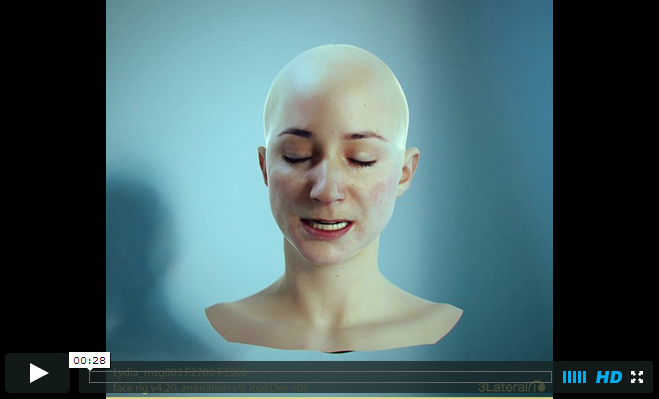
Are We Passing the Uncanny Valley?
Today, almost isn’t close enough and can hurt your presentation. People get an uneasy feeling, which some say is inherent in our nature, and inherently don’t like things that are almost real looking, but not close enough. Are we passing the Uncanny Valley?
Did you enjoy this article? I would love to hear your thoughts, so don’t be shy and comment below! Please don’t forget to subscribe to my RSS-feed or follow my feed on Twitter, Google+ and Facebook! If you enjoyed the following article we humbly ask you to comment, and help us spread the word! Email me
Augmented Reality for Architects and Contractors
Everyone knows virtual reality, but have you considered how augmented reality in architecture and construction could help your firm?
Augmented reality is a live, copied view of a physical, real-world environment whose elements are augmented (or supplemented) by computer-generated sensory input. Virtual reality replaces the real world with a simulated one, whereas augmented reality takes the real world and adds to it with—in the case of architecture—a 3D model of your design.
With the help of advanced augmented-reality technology such as computer vision and object recognition, the information about the surrounding real world of the user becomes interactive and able to be digitally manipulated. In augmented reality, computer software must derive real-world coordinates, independent from the camera or from camera images.
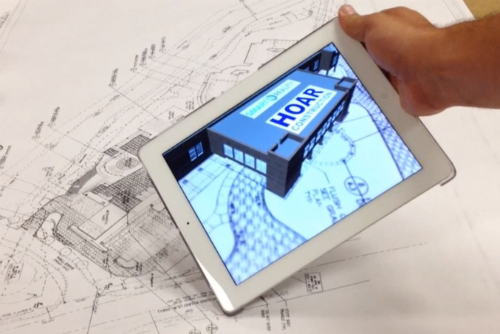
SmartReality augmented reality app from JBknowledge
Augmented reality is used in architecture and construction by placing a 3D model of a proposed design onto an existing space using mobile devices and 3D models. AR has been used in the video gaming and media entertainment for a much longer period of time to show a real image interacting with one created from computer graphics. Its utilization matured in the AEC industries in the past five years when contractors such as Seattle’s BNBuilders began using it to show clients proposed designs in the context of existing conditions using iPads and other mobile devices on a construction site.
Seeing a Revit or other 3D model in context greatly assists in space planning and design visualization. Augmented reality was confined mostly to AEC firms that had large technology groups who could spend hours integrating Revit models with homemade 3D game engine models, but the technology has now been democratized and is available on a per-project basis, so small firms and even sole proprietors can take advantage of it.
SmartReality from JBknowledge, a technology company previously known for bringing subcontractors and jobs together, is a mobile AR app available as a beta test on a per-project basis. It can place a 3D model in context, viewable through an iPad or iPhone, whether on a 2D set of plans, in front of an actual site, or even on an image of your project’s site. Users focus on a given design or plan file with the camera on their iPad, iPad Mini, or iPhone; the app then recognizes the design, and the screen overlays a virtual model of what the project will look like upon completion. Anyone can see a Revit model in context (Revit drawings have to be imported into a different format to be recognized), in a full, 360-degree view.
Augmented reality has a wealth of design and construction uses beyond visualization, too. It can be used for design analysis to pick out clashes by virtually walking through your completed model. It fits the bill for constructability review by letting the architect and contractor collaborate on changes that have to happen between design and construction due to constructability issues. It can even assist with prefabrication of building components.
An oft-cited use of augmented reality came in the aftermath of the 2011 Christchurch earthquake in New Zealand. The University of Canterbury released CityViewAR, which enabled city planners and engineers to visualize buildings that were destroyed in the earthquake. It gave planners a great reference to what used to be there while also letting them gauge the devastation the quake left behind. Since then, it’s been used as a tool throughout Australia for construction and earthquake investigation.
To learn more about AR, check out 3 Steps to Tap into Visualization with 3ds Max, and read about virtual reality In Take a Walk Inside Your Designs.
Does your firm use augmented reality? If so, how do you use it? Please share your experiences below in the comments section.
CityViewAR is available for both iPhone and Android athttp://www.hitlabnz.org/index.php/products/cityviewar. To download the beta of SmartReality for iOS, visit http://smartreality.co/. To learn more about how BNBuilders has used augmented reality, visithttp://www.bnbuilders.com/building-information-modeling/.
Embracing Change
They say change is the only constant, and most people don't like change. Well I think that's half correct. To be sure there are a lot of change efforts at work that fail, because the effort wasn't planned well. Employees had no voice in the process, or the right resources weren't in place.This reality makes many employees jaded whenever any manager starts talking about change.But it's also true that humans get stuck in ruts.
Employees find comfort in the routines that define their day. Anything that upsets those routines just might be met with resistance. So what can you do to overcome that tendency and personally deal with change successfully, especially unexpected, difficult change? Good research and common sense tell us that attitude is everything. In sports, the elites have been studied. We know much about how they think and how they behave. They relentlessly focus on the positive perspective, framing things in a way that speaks to opportunities to be realized, instead of tough challenges to be dreaded.
They plan and adjust as needed, never believing that what they are today is who they need to be tomorrow. And the very same traits are found in great leaders. If you don't follow this advice,you know what? You become the professor who appears completely irrelevant to his students.Using 20 year old examples that don't really apply anymore. You become the company that ultimately fails because they believe customers will love the same product tomorrow that they loved today. Doesn't have to be that way. You can learn to make change work for you.
Coping with change and embracing change is a skill. It starts with building an identity bigger than only your professional identity. Even if you love what you do, that's too narrow. Healthy people have multiple, positive identities in addition to their professional identity. This might include father or volunteer or maybe basketball coach. Whatever it is, remember that to stay healthy,you need to be more than just one thing. Next, listen to the age-old advice about counting your blessings.
There's no mystery to share here. You just need to do what many people neglect to do.Periodically stop and reflect on the many specific things you're lucky to have in your life. A person who supports multiple positive identities in life and remembers to take stock of the things they're lucky to have in life is exactly the type of person who has the best odds of successfully navigating change. Okay, now when change actually hits, whether it's a merger you never saw coming and the new boss that comes with it or if it's the loss of your job that you didn't expect.
I want you to react in three simple ways that will help you make change more about possibilities instead of pains. First, remember to think before you act. When big change hits, don't make hasty decisions. Your emotions will be on overdrive. So here's the rule. No big decisions for at least 48 hours. Depending on what's happened, you'll be thinking about your team, your house, your finances, your family, you name it. Resist making quick decisions on any of these for at least 48 hours.
Next, when the shock is gone, it's time to start adjusting, to begin facing your new normal. This begins with a passionate commitment to being positive. You have to make the choice to be better, not bitter. Think about that choice consciously, first thing in the morning, everyday following a big change. Finally, of course, you have to take action. I want you to think about a multi-month plan of attack loaded with specific tasks and deadlines. Depending on the nature of the change the tasks will be different.
If there are problems with the new boss, this might include learing how to initiate tough conversations. Or if you're our of work, you might be spending a lot of time becoming laser focused on networking. This all might sound pretty easy in the abstract, but believe me, easy becomes very difficult when you're stressed out and dealing with the unexpected. That's why it's so inspiring to witness someone deal with change and adversity effectively.
What Is The Resolution Of The Eye?
The new iPhone camera is 8-megapixels. Meanwhile, Canon is reportedly testing a new DSLRwith 75-megapixels. But how many megapixels is the human eye? That is, how many megapixels would an image the size of your field of vision need to be to look normal?
Well, as Vsauce explains in its latest video, the better question is actually: What is the resolution of the human eye?
It's a complicated question, one that must take into account the peculiar anatomy of the eye which is different than the less peculiar engineering of a digital camera. As such, it's worth watching all ten minutes of the video, explaining not only how we see but also how well. Spoiler: the human eye is 576 megapixels—but really only about 7 megapixels matter.
The Art & Science Of Creativity

The Art & Science Of Creativity
I’m really excited to announce that my newest online video course, The Art And Science Of Creativity is now live on Udemy.
How many times have you heard that certain people are just “born creative,” and certain people “aren’t.” It’s not true. Creativity is a process with clearly defined steps that you can learn and apply towards ANY project. Using techniques taken from brain science to rocket science, you’ll learn that everyone, including you, is born creative. If you think of yourself as creative already, this course will make you more efficient and productive with your creativity. If you think of yourself as one of the “not creative” people, this class will show you that you ARE creative, and how to bring that creativity to fruition.
The course teaches a creative process: from coming up with an initial idea, unpacking and expanding upon it, to shaping and refining it, the seven key principles of creativity – principles that apply whether you are working by yourself or as part of a team, the common roadblocks to creativity, and the remedies to get you through these roadblocks if and when they occur, so you can move forward on your project.
And in the course we talk about the brain science of the unconscious, how it applies to creativity, and how to give your brain the right data it needs to figure out the problem or next course of action, even when you are not consciously working on it.
Here’s the opening lesson:
Go to the Udemy page for more information, to register for the course, or preview more videos.
We are offering a special price ($89, more than 50% off) if you register by March 3, 2014 and use the coupon code: VIPEntry
Instead of teaching this one by myself, I’ve got a co-instructor, Sam Spitzer. Sam is a rocket scientist, inventor, and composer. He’s very creative! I think you will enjoy learning from the two of us together.
Sampling for Arch Vis renders in Vray 2.4
“This is a run through of how I approach sampling in vray 2.4 starting with the anti-aliasing and working my way through the different aspects of a scene methodically, to try and get predictable and clean results.”
Make Your Autodesk® Revit® Drawings and Presentations Look Great!
Description
This class will show you how to get the most out of the powerful graphic features of Autodesk Revit software and incorporate all of the exiting new features in Revit 2013. You will learn valuable tips and tricks and time-proven visualization techniques to make your drawings look great. You will learn how to enhance non-rendered and rendered views with out-of-the-box advanced graphic techniques, how to improve the trees and plants used in Revit for non-rendered views, how to add photo backgrounds to renderings using a unique overlay approach, how to add a fully controllable gradient color background behind multiple views, as well as tips for improving interior and exterior rendered views. And finally, you will learn how to use old-world hand drafting techniques to add visual clarity and make your construction documents communicate and look better. Techniques include poche and surface shading patterns, profiling, transparency, and toning to create graphical layering and sheet layout.
Key Learning
- Learn unique out-of-the-box tips and tricks to prepare presentations more quickly and better than ever
- Use time-proven techniques to make your construction documents communicate better and look as beautiful as they are smart
- Explore and take full advantage of powerful basic and advanced graphic tools and capabilities in Revit
- Use a variety of presentation techniques to help develop your own artistic style
Speakers
Primary Speaker : Steven Shell
Steven C. Shell graduated from the University of Arizona in 1982, and has had his own architectural firm in Tucson, Arizona, for over 23 years. Mr. Shell has been using Autodesk Revit Architecture® exclusively for over eight years. He is the co-founder and co-chair of the Southern Arizona Revit users group (SARUG). Mr. Shell is certified by Autodesk in Revit, and chairs monthly SARUG meetings. He has taught Revit at the University of Arizona College of Architecture and Landscape Architecture where he also hosted Revit workshops for the students and faculty. He has presented at Pima College and presented at the Revit Technology Conferences (RTC – USA) where his class was voted one of the top 10 classes. In addition to his Architecture practice and teaching Revit, he was re-appointed to the City of Tucson’s Board of Adjustment, where he previously served as chairperson for 8 years, as well as serving 10 years on the City’s Design Review Board and Sign Code Advisory & Appeals Board.

See It & Sell It: Professional Architectural Illustration with Bobby Parker
“Architecture is a competitive business. There are thousands of talented designers out there, and selling your concepts, or choosing between different plans if you’re a home buyer, is a lot like other parts of life: it all starts with great presentation. That’s where architectural illustration comes in. A beautiful rendering is like great package design – it attracts attention and teases out buyer curiosity. But it’s also part of the product itself. Effective illustrations breathe life and zest into building plans, firing up the imagination and bringing depth of understanding to those of us who struggle to see an architect’s vision without additional help.
Minnesota-based architectural illustrator Bobby Parker has many years experience in architectural rendering and kindly spared a bit of time to fill us in on some of the aspects of working in this rapidly changing field”

Color Palette Creation is a Breeze With ColorPic
Ever tried using a color picker on a high resolution monitor? It's impossible. That's why this color picker has a magnifier attached. Grab palettes of up to 16 colors at once and use four advanced color mixers to select a spectrum of possibilities.
Version 4 is now available, with the following features:

- Easily pick any color from the screen
- Totally 100% Free!
- No popup adverts or spyware, it really is free
- Colors shown in hex and decimal
- Adjust Hue, Saturation, Value, Red, Green and Blue values
- Cyan, Magenta, Yellow and Black percentages shown
- Easy to use with any other program
- Resizable magnification area
- Overlay a grid for quick colorpicker alignment
- Use arrow keys to nudge mouse pointer
- Save multiple palettes of colors automatically
- WebSafe Colors and names displayed
- Snap to nearest WebSafe color
- Point sample, 3x3 or 5x5 pixel color sampling
- Adjust color with four advanced color mixers
- Edit colorpicker values after selection easily
- Easy to use collapsible sections
- Works with Firefox, Internet Explorer, Photoshop and any other application