

BLOG
What is a Genius?
A genius is someone who is both extraordinarily intelligent and extremely creative. Plenty of people are smart and even intelligent, but they aren't quite geniuses because they lack the creative abilities required. Other people are creative to some extent, but they do not have the intellectual capability to harness their creativity. Some famous examples include Mozart, Isaac Newton, and Albert Einstein, who is often used as the classic illustration for this term.

The exact definition of this word is actually rather difficult to pin down, because there are no clear, subjective measures that can be used to classify who is a genius and who is not. Generally, it is assumed that one has a unique and novel way of approaching situations and the world, retooling ideas and potentially creating something so monumental that it changes the way other people think. Einstein, for example, came up with a mathematical formula that changed the face of physics.
Some people measure genius on the basis of someone's Intelligence Quotient (IQ). This measurement is far from ideal, however; many people think that IQ tests are limited, and the true test of a genius is what he or she produces in life. These individuals are also often talented in multiple fields, in which case they could also be considered polymaths. Leonardo da Vinci, for example, was a polymath, skilled in the arts and sciences. Einstein, on the other hand, focused on physics specifically.
Some people feel that geniuses are crippled by their own intelligence. It is true that some have had difficulty with social interactions historically, and some of them have interesting quirks. Being a genius does not inherently mean that someone cannot function in the world, however, and plenty of these people are perfectly capable of handling the events of a day to life, often with great success. Because many think in ways which are very different, sometimes it can be a challenge to follow a conversation with such a person.
Why one person becomes a genius while someone else remains relatively ordinary is a mystery. There appear to be clear genetic links, although environment is also an important factor. Scientific studies of the brain have also suggested that such people may have slightly different brains. Incredibly gifted individuals may be talented because their minds are actually wired differently, facilitating communication between normally isolated areas of the brain or changing the way in which information is processed. The fact that many of these people are child prodigies supports this belief, as it suggests that the groundwork for genius is laid early
V-Ray 3.0 for 3ds Max Beta New Licensing
The release of V-Ray 3.0 for 3ds Max introduces new licensing choices and policies:
Please note:
Users who purchased a new V-Ray 2.0 for 3ds Max commercial license between 4 August 2013 and the date of the V-Ray 3.0 for 3ds Max official release will be eligible for a free upgrade. They will receive 1 V-Ray User License (GUI) and 3 Render Node licenses.
If you have any further questions about the new licensing and pricing policies, please contact us atlicensing@chaosgroup.com.
UNIVERSAL RENDER NODES
A major part of the V-Ray roadmap includes the development of universal V-Ray assets that can be shared across multiple 3D platforms. With the release of V-Ray 3.0, we are introducing universal V-Ray Render Nodes to support distributed rendering and network rendering on multiple host applications.
One Universal Render Node may be used across the following 3D Platforms:
Host ApplicationVersionsV-Ray for 3ds Max3.0V-Ray for Maya3.0V-Ray for SoftimageTo be supported in the futureV-Ray for RhinoTo be supported in the futureV-Ray for SketchUpTo be supported in the futureV-Ray Render Nodes are required to render with V-Ray 3.0 for 3ds Max.UNIFIED LICENSINGIn V-Ray 3.0 the User licenses and Render Nodes are licensed separately. This unifies licensing across applications and reduces the cost for individual User licenses.
Pricing: V-Ray 3.0 for 3ds Max
Product/ BundleUSDEURGBPV-Ray 3.0 Workstation for 3ds Max (?)1 050750650V-Ray 3.0 Workstation for 3ds Max+ 5 V-Ray Render Nodes 3.0
2 0901 5001 290Pricing: V-Ray Render Nodes 3.0USD/ per NodeEUR/ per NodeGBP/ per Node1-4 Licenses3502502205-9 Licenses28020017010-19 Licenses25018016020-29 Licenses24017015030+ Licenses210150130FLEXIBLE TERM LICENSING
Flexible options for monthly and annual licensing are now available. With lower upfront costs, term licensing allows artists and studios to scale as needed.
Pricing: Annual Licensing
V-Ray 3.0 Workstation for 3ds MaxUSDLicense/YearEUR
License/YearGBP
License/Year5-9 Licenses
53037532510-19 Licenses
44031527020+ Licenses
340240210V-Ray Render Node 3.0USD
License/YearEUR
License/YearGBP
License/Year5-9 Licenses17012010010-19 Licenses1401009020+ Licenses1108070
Pricing: Monthly Licensing
V-Ray 3.0 Workstation for 3ds MaxUSDLicense/MonthEUR
License/MonthGBP
License/Month10-19 Licenses
19013512020-29 Licenses
130908030+ Licenses
1107570V-Ray Render Node 3.0USD
License/MonthEUR
License/MonthGBP
License/Month10-19 Licenses90605020-29 Licenses70504530+ Licenses604035
* Prices do not include dongle/VAT/shipping.
V-Ray VFX & Game Cinematics Showreel 2013
The Official V-Ray Showreel 2013 - Film & Game Cinematics
V-Ray I.R.L.
V-Ray friends honor Chaos Group team with this special anniversary video! Thanks to some of the best VFX people for being part of the V-Ray development for over a decade!
3D Camera Technology
Floored scans office spaces, apartments and houses using 3D camera technology and proprietary software to build customizable 3D models for real estate purposes. Instead of static photos and floor plans, you can move around in real-time, add furniture and easily realize if the space is a good fit.

Six Steps To Consider Before Launching a Small Business
So you're thinking about starting your own small business but aren't pretty sure from where to start and which steps you should strike first in order to make your dreams of becoming self-employed? No problem this infographics is here to help with six simple steps to get you going on the right way to build your successful business.

This infographics answer 6 major question that small business owners should ask themselves before startup.
First step, if you've a great idea then you need to do some research that can be helpful to decide if it will give a result.
Second step, gather data from the internet about your competitors and research what their weaknesses.
Third step, if you've a clear vision for your small business try to put a vivid and inspiring statement about your vision.
Fourth step, outline some short and long term goals and how you will to chase your objectives.
Fifth step, as an entrepreneur you will be called on to wear many hats in order to successfully operate your small business. Involve an advisor that can help you to be more effective in your business venture.
Sixth step, A mixture of financial sources may be the best way to raise the money you will need to start your small business.

What is Color Temperature?
Understanding color temperature is one of the crucial rules of architectural rendering you must learn before you can begin to break them.
So what is color temperature? In short, each light source has its own individual color, or ‘color temperature’, which varies from red to blue.
Candles, sunsets and tungsten bulbs give off light that’s close to red (hence the ‘warm’ look they give to pictures), whereas clear blue skies give off a ‘cool’ blue light. It’s fairly obvious stuff once you read it.
Color temperature is typically recorded in kelvin, the unit of absolute temperature. Cool colors like blue and white generally have color temperatures over 7000K, while warmer colors like red and orange lie around the 2000K mark.
In the infographic below we’ve illustrated the color temperature scale and show you where these popular white balance settings sit within it. We’ve also shown where some common shooting conditions, such as hazy skies and sunsets, sit within the color temperature scale and what white balance setting you might want to use to capture accurate colors in these conditions.
To view the larger version of this photography cheat sheet simply click on this infographic or drag and drop it on to your desktop to save as a reference.


V-Ray 3.0 for 3ds Max Beta
The V-Ray® 3.0 for Autodesk® 3ds Max® Beta program is now open.
With this beta program, our users can get their hands on new and improved features and capabilities of the best version of V-Ray yet. Thanks to our continuous work with 3D artists all over the world, V-Ray 3.0 for 3ds Max has now become the most complete lighting, shading and rendering toolkit on the market.
We've set up a new website dedicated to become a new home for the V-Ray community. Be sure to check out www.v-ray.com for more V-Ray 3.0 related news and stay tuned for updates, videos and tutorials.
Eligibility
The V-Ray 3.0 for 3ds Max Beta program is available to licensed users of V-Ray for 3ds Max.
You may register for the beta program here. Our team will review your application and send you an email outlining next steps.

Feedback process
As a member of the beta community, you will get an advanced look at the upcoming features and enhancements in V-Ray 3.0. Plus you will have a unique opportunity to provide critical feedback, helping create the best version of V-Ray yet.
During the beta process, you will have direct access to our development team and the beta community via a V-Ray 3.0 for 3ds Max Forum. The forum is dedicated to sharing constructive feedback, works in progress, test renders, and user suggestions.
Time Frame
The Beta program will run for a period of approximately 3 months.
System Requirements
• A computer with 3ds Max 2011/3ds Max Design 2011 or later, 64 bit versions only;
• Windows XP, Windows Vista, Windows 7, Windows 8, 64 bit versions only;
• Intel Pentium IV or compatible processor with SSE2 support;
• 128 MB RAM and 350 MB swap minimum - recommended 4 GB or more RAM, 4 GB or more swap file;
• NUMA architecture is supported but not recommended*
Note: More efficient rendering on a NUMA machine is achieved with several copies of 3ds Max or DR render servers. In both cases each instance should be limited to one NUMA node because of the slower access that a core has to the rest of the RAM.
Autodesk 3ds Max is a registered trademark of Autodesk. V-Ray is a registered trademark of Chaos Software
Perfect Effects 4 Free
Improved! Library of Effects
Create images with impact using over 70 professional effects that help you enhance detail, add contrast, evoke moods, and more.

Combine Effects
Design a look all your own by combining multiple effects and adjusting the strength of each effect. With the live previews in Perfect Effects 4 Free, you can see what each effect will look like on your photo before applying it. Your creative options are limitless and easy to achieve with the easy-to-use tools in Perfect Effects 4 Free.
Masking Controls
Selectively apply any effect to specific parts of your photo with the powerful masking controls in Perfect Effects 4 Free. Use the Masking Brush to apply effects to specific areas and the Masking Bug to quickly create vignettes and graduated filter looks.


New! Paint-In Effects
With a handy set of Basic Brushes, you can solve some of your most common digital photography problems exactly where you need. Use simple brush strokes to make areas darker, lighter or warmer. Add detail, glow or more color. You can also reveal highlights and recover shadows.
New! Perfect Brush
Smoothly apply or remove effects to the specific areas you're working on without going "outside of the lines."
Turn on the Perfect Brush when using the Masking Brush or the Paint-in Effect Basic Brushes.

New! Blending Modes
Blend effects to create amazing and highly stylized looks in Perfect Effects 4 Free. By changing the Blending Modes, you can control the brightness, contrast and color of the image to dramatically alter the appearance. And, by adjusting the opacity, you can control the strength of the effect.
Combine Images for Endless Creative Options
In the Layers home module, you'll find tools designed specifically for photographers to combine the best parts of multiple photos and quickly retouch your images. You'll easily be able to swap faces or create a balanced exposure. You can also blend images for creative effects, create layouts, build composites, and more. Enjoy all of the benefits and creative power of a layered workflow, even without Adobe Photoshop. Your creative options are endless.


Motiva exposure control for V-Ray
Get this plugin for free, compatible with 3dsmax 2012-2013-2014 32&64 bits in conjuntion with V-Ray 2.40.04
"Young Frank, Architect"
This whimsical children’s book by award-winning author and illustrator Frank Viva explores MoMA's collection through the adventures of Young Frank, an aspiring architect, who lives in New York City with his grandfather, Old Frank, also an architect. Young Frank likes to use anything he finds—macaroni, pillows, toilet paper, shoes—to make buildings that twist, chairs with zigzag legs, and even entire cities. But Old Frank disapproves, saying architects only create buildings.
One day they visit The Museum of Modern Art, where they see work by architects Frank Gehry, Frank Lloyd Wright, and many others, and Old Frank learns that architects can do more than he thought. The Franks go home and create structures of every shape and size, using whatever they can get their hands on, even cookies. At the end of the day, Young Frank feels a little older, and Old Frank feels a little younger—and a little wiser.
To download a sample PDF of Young Frank, Architect click here.
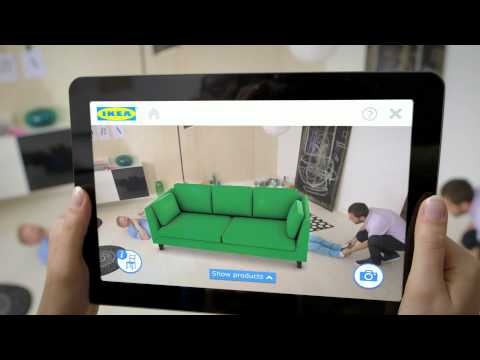
Augmented Reality Designs Your House With IKEA Furniture
You think about changing the decor of your house and the first thing that comes to your mind is IKEA.
You sit down with that big IKEA catalog at night after work, flip through the pages and try to imagine how the pieces you're eyeing would actually fit in your home. You even start measuring with a ruler, doing calculations hoping your favorite piece of decor would fit into your space.
You love the armchairs and bookcases but somehow they never look as perfect in your cramped apartment as they do in the aptly decorated showrooms.
This demotivates you to even take a look at the catalog leave alone visiting the store.
But now you’ll look forward to pick up that decor book and re-design your house.
IKEA's 2014 catalog aims to ease some of that angst by letting you plan ahead with its augmented reality feature.
This new feature, which will be available on August 25 and uses an augmented reality technology, allows you to see what the furniture would really look like in your own home.
How to go about it.
All you have to do is scan the pages of catalog with the augmented reality app on your mobile device, place the printed catalog wherever you'd like in the spot where you're considering adding a new piece of furniture.With the camera on the phone or tablet, the app captures an image of the room, using the catalog as a size guide, for the virtual furniture that you can place in the room. After this step you can select the desired item with a 3-D model view of the piece in your room on your phone or tablet.
Since the app uses the front cover of the catalog as a reference, it is likely you can use a printed copy of the Ikea catalog cover instead of having to bring along an entire book.
Ikea is actually transporting its products into your house, associating your living room with its showroom through a sort of digital test drive. So you needn’t visit the store, of course.
The 2014 catalog will be available in print, as well as on iPhone, iPad and Android.
You can also look forward to several highly anticipated new releases, such as the Lövbacken table, a revival of the company's original flat-pack table produced in 1956.
Watch the video above to see how it works:
Minnesota University 2013 (HD) - Autodesk Discussion Panel
This is a panel of representatives from Autodesk who discuss questions from Architectural, Engineering and Construction (AEC) customers about Autodesk software, and where the industry is going.
Minnesota University is a regional professional development event where attendees learn about new and emerging technologies, new features of Autodesk software, tools and techniques that keep architects and building engineering firms competitive.
Keynote: BIM Adoption in North America
This is the first keynote address for Minnesota University 2013, as presented by Dan Hamilton from Autodesk. It provides information about BIM adoption in North America.
Minnesota University is a regional professional development event where attendees learn about new and emerging technologies, new features of Autodesk software, tools and techniques that keep architects and building engineering firms competitive.
See Like An Artist
Check critical proportions and locations while using "transparent mode", which creates a virtual projection onto your work surface.

Simplify your subject into its basic value patterns. Train your eye to see the lights and darks before you get into the detail of color and modeling.
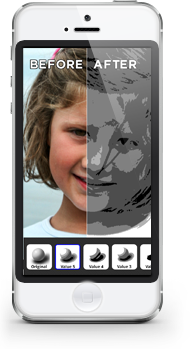
Throughout the history of art, artists have searched for ways to produce their work more quickly and more accurately. Research has been written that argues that even the old masters - people like Rembrandt, Vermeer and Caravaggio likely used innovations like the camera lucida and camera obscura. Artist's Eye re-imagine's these devices using the power of modern technology!
Vray 3.0 renderer with Vladimir Koylazov
Chaos Group, have published an online magazine covering a preview of their upcoming Vray 3.0 renderer with Vladimir Koylazov, (Vlado, creator of Vray), plus some great interviews with artists from studios like Blur and Factory Fifteen. You can download or read the magazine online via the Chaos Group website.
